BMS Go · Mobile App
Run Your Business.
On the move.
Dashboards, approvals, alerts. White-labelled. Made in India.
Made for India.

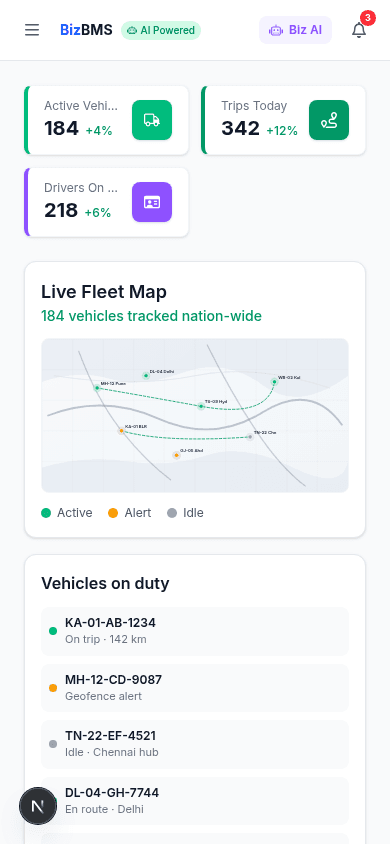
What's in BMS Go
Four things your team will open it for
Every feature in BMS Go maps to a workflow already running in your BMS. Nothing rebuilt. Nothing duplicated.
Dashboards
Live KPIs across revenue, dispatch, collections, and pipeline, refreshed in real time.
Approvals
POs, expenses, leaves, and credit limits. Reviewed and signed off with one tap.
Alerts
Only the signals you configured. SLA breaches, stock-outs, payment delays, flagged tickets.
Field operations
Attendance, GPS check-ins, photo uploads, and task updates. Works offline, syncs later.
In production today
What you get with BMS Go
Faster decisions, less work for your tech team, your brand on the stores.
Fast brand-kit to app stores
Send us your brand assets. We build, test, and publish. App store review timelines apply.
Faster approval cycles
Leadership approves on mobile instead of waiting for email chains and paper flows.
No app code to maintain
Updates, store submissions, and releases handled by us.
Parity with your BMS
Same data, same workflows, same permissions as on the web.
BMS Go vs. building your own
Why most teams don't build a custom app
A native mobile app for your operations stack takes a full product team and a long runway. BMS Go gives you the same thing, already wired to your data.
BMS Go
Included with BizBMS
Building a custom app
In-house or agency
Built for three kinds of users
One app. Three very different jobs.
BMS Go adapts to the role. Leadership sees KPIs. Ops runs workflows. Field teams log work. All from the same app, all governed by the same permissions.
For leadership
The board view, in your pocket
Live KPIs, one-tap approvals, and alerts you actually configured. Run the business between meetings.
- Today’s revenue, orders, and dispatch at a glance
- Approve POs, discounts, and leaves with full context
- Drill into any KPI with a tap
- Push alerts only for the thresholds you set
For operations
Workflows that move at field speed
Tickets, escalations, and approvals keep flowing whether your team is at a desk or on the move.
- Live ticket queues with ownership and SLA status
- Route, reassign, or escalate from the notification
- Approve multi-stage workflows on mobile
- Real-time updates across web and mobile
For the field
Your field team’s workbench
Attendance, tasks, GPS check-ins, and photo capture, built for the people doing the work on the ground.
- GPS-stamped attendance and shift tracking
- Daily task lists with priorities and proof-of-work uploads
- Site visits with location and timestamp
- Offline-first: captures now, syncs when back online
A day with BMS Go
Run your business from anywhere you happen to be
Open BMS Go. Check yesterday’s revenue, top performers, and any red flags before your 9 AM review.
Your ops head requests approval for an emergency inventory transfer. Read the context, tap approve, done.
Pull up the customer’s order history, outstanding invoices, and open tickets while you are in the room.
Alert comes in: payment gateway failed on three orders. Reassign to the on-call engineer from the notification.
Your logo. Your colors. Your app on the stores.
BMS Go ships as your app, not ours. Published on the Apple App Store and Google Play under your company. Customers, field teams, and leadership see your brand from the first screen.
- Your app name, icon, and splash screen
- Your brand colors throughout the UI
- Published under your developer account
- Store listing, copy, and screenshots, done for you
App Store preview
YourBrand Ops
YourBrand Pvt. Ltd.
How white-labeling works
From brand kit to app stores in three steps
You send us the brand. We handle the rest, including store listings, review cycles, and publishing under your developer account.
Share your brand
Logo, colors, app name, and developer account credentials. One intake form, no design reviews from your side.
We build and configure
Your BMS Go app gets themed, tested on real devices, and wired to your deployment.
Publish under your brand
We submit to the App Store and Google Play as your company. Updates and store listings stay managed by us.
Part of BizBMS
BMS Go is part of something bigger
Your team already works from BizBMS on the web every day. BMS Go brings the same thing to their phone.
Put your business in every pocket.
Book a 30-minute walkthrough. We'll show you BMS Go working on a real deployment and what it would look like as your app.
iOS · Android · White-labelled · Included with every BizBMS deployment